
Featured Article
Technology
Integrating Voice AI with Retail POS Systems: A Technical Deep Dive
For retail businesses embracing voice AI, seamless integration with Point of Sale (POS) systems is paramount. This integration unlocks real-time inventory visibility, streamlines order processing, simplifies payment handling, and provides access to valuable customer data. Ultimately, proper POS integration powers a cohesive omnichannel customer experience. While the complexity of integration varies based on the POS platform, the underlying principles and architectural patterns remain consistent. This guide offers a technical overview for retail IT directors, integration engineers, software architects, and DevOps teams responsible for deploying and maintaining these integrations.
Major POS Platforms and Integration Approaches
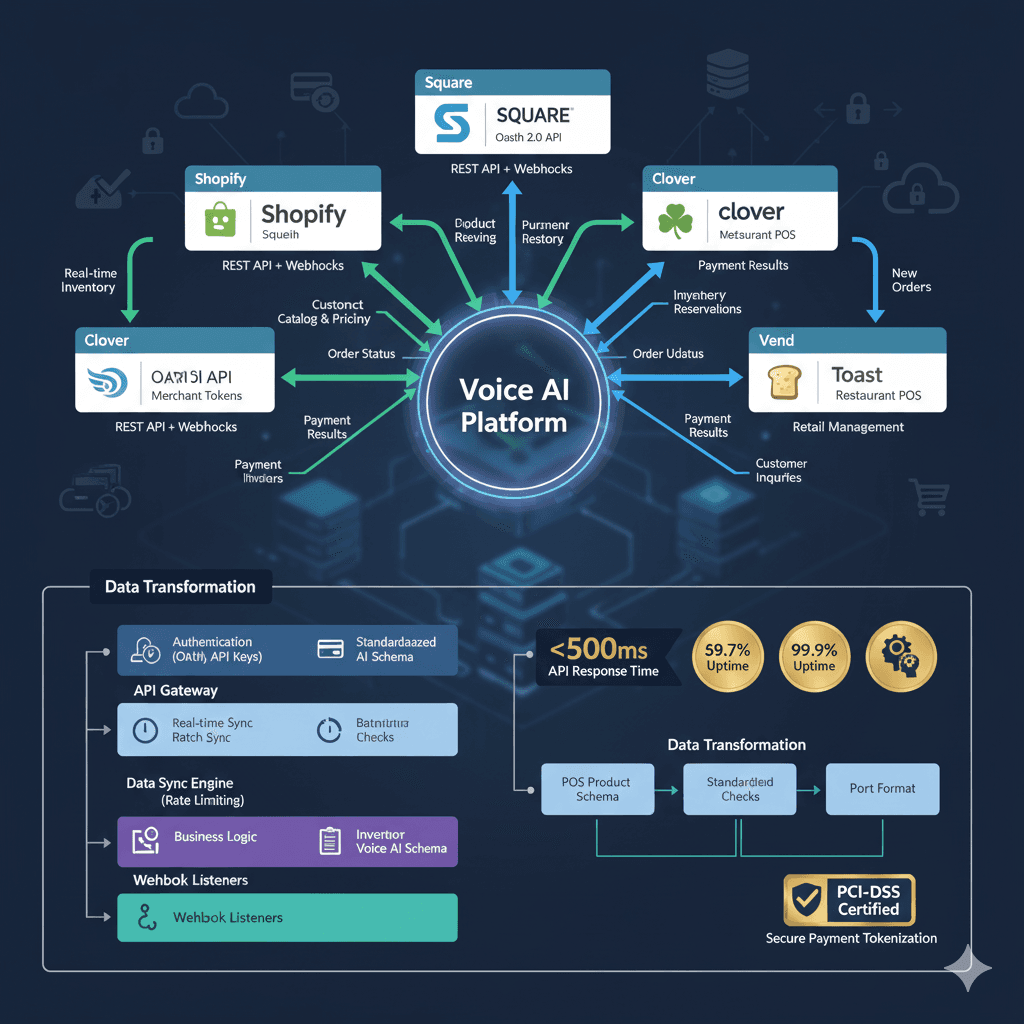
Here's a breakdown of common POS platforms and their respective integration methods:
Shopify: (Leading e-commerce platform, ~28% online retail market share)
Integration: REST Admin API and Storefront API, webhook subscriptions for real-time updates, OAuth 2.0 authentication.
Capabilities: Product catalog with variants, real-time inventory across locations, order creation and management, customer profiles and purchase history, Shopify Payments integration.
Typical Integration Time: 2-3 weeks.
Square: (Popular for small-medium retail, ~18% market share)
Integration: Square Connect API (REST), OAuth for merchant authorization, webhook events for updates.
Capabilities: Catalog management with modifiers, real-time inventory tracking, payment processing, customer directory, loyalty program access.
Integration Time: 2-4 weeks.
Lightspeed: (Retail and restaurant POS, strong in specialty retail)
Integration: Lightspeed Retail API (REST) or GraphQL for advanced queries, OAuth 2.0.
Capabilities: Multi-location inventory, customer accounts, purchase history, layaway management, e-commerce integration.
Integration Time: 3-4 weeks.
Clover: (Versatile merchant platform)
Integration: Clover REST API with merchant tokens, app permissions model.
Capabilities: Inventory management, order creation, payment acceptance, customer engagement.
Integration Time: 2-3 weeks.
Others: Toast (restaurants), Vend (retail management), Revel (iPad POS), NCR Counterpoint.
Core Integration Architecture Components
A robust voice AI to POS integration typically incorporates these key components:
API Gateway: A centralized connection point for all POS API calls.
Handles authentication (OAuth 2.0 flows, API key management, merchant tokens).
Implements rate limiting to prevent API overload (typically 100-1000 req/min per merchant).
Enforces SSL/TLS encryption for all data transmission.
Provides request/response logging for debugging.
Data Synchronization Engine: Manages data consistency between the Voice AI system and the POS.
Real-time sync for critical data (inventory levels, order status, payment confirmations) via webhooks.
Periodic sync for less dynamic data (product catalog updates hourly, customer data nightly batch).
Conflict resolution (POS is the source of truth for inventory, orders, and pricing).
Sync status monitoring with alerts for failures.
Schema Mapping Layer: Transforms POS-specific data models to a unified Voice AI schema.
Example: maps Shopify "variant_id" + Square "item_variation_id" to Voice AI "product_sku".
Handles field differences across platforms (e.g., size stored differently).
Validates data types and formats.
Manages null/missing data gracefully.
Business Logic Layer: Implements retail-specific rules and processes.
Inventory reservation during voice shopping (holds an item for 10 minutes).
Multi-location inventory checking (finds the product at the nearest store).
Price and tax calculation using POS rules.
Order validation before submission (sufficient inventory, valid payment method).
Payment Processing Integration: Securely handles payment information.
Secure payment tokenization for voice orders (captures card details, tokenizes them, and sends the token to the POS for processing).
PCI-DSS compliant handling (no storage of card numbers, encrypted transmission).
Payment confirmation flow.
Refund processing for returns.
Error Handling and Resilience: Ensures the system remains functional even when errors occur.
Graceful degradation (if the inventory API is unavailable, show the last cached data with a disclaimer).
Retry logic with exponential backoff for transient failures.
Circuit breaker pattern to prevent cascading failures.
Comprehensive error logging and alerting.
Step-by-Step Integration Process
A typical integration timeline might look like this:
Week 1: Setup and Access
Day 1-2: Obtain POS API credentials (requires merchant account or partner agreement), configure OAuth application for Shopify/Square, set up development/sandbox environment.
Day 3-5: Review API documentation for required endpoints (products, inventory, orders, customers, payments), test basic API connectivity, understand rate limits and quotas.
Week 2: Data Integration
Day 6-9: Build product catalog sync (GET products with variants, pricing, images, attributes), implement inventory tracking (real-time stock levels across locations), create customer data integration (profiles, purchase history, preferences).
Day 10: Test data accuracy and sync performance.
Week 3: Order Processing
Day 11-14: Develop order creation flow (cart → checkout → order in POS), integrate payment processing (capture → tokenize → authorize → confirm), build order status tracking (pending, confirmed, shipped, delivered), implement return/exchange processing.
Day 15: End-to-end order testing.
Week 4: Testing and Optimization
Day 16-18: Integration testing with staging/sandbox POS environment, test error scenarios (out of stock, payment declined, API timeout), performance testing (handle peak traffic loads), security testing (payment security, data encryption).
Day 19-21: User acceptance testing with retailers, optimize API calls for efficiency (batching, caching), prepare for production deployment.
Week 5: Production Launch
Day 22-25: Configure production POS credentials, deploy to production with monitoring, parallel testing (compare Voice AI orders with direct POS), gradual rollout (start 10% traffic).
Day 26-30: Monitor for issues, full production rollout, documentation for support team.
Critical Integration Considerations
Pay close attention to these factors during integration:
Inventory Accuracy: Sync frequency (real-time for fast-moving items, hourly for slower), handling inventory reservation (temporary hold during checkout to prevent overselling), multi-location logic, safety stock buffers.
Product Catalog Management: Handle variants correctly, sync product images, capture product attributes for voice search, and map categories for search navigation.
Real-time vs Batch: Inventory levels and product pricing require real-time updates. Catalog updates and purchase history can be handled in batches.
Payment Security: Tokenize sensitive data immediately, comply with PCI-DSS standards, encrypt all payment transmission, and audit all payment API calls.
Error Messages: Translate POS error codes into customer-friendly messages. Provide alternatives when possible.
Performance Optimization: Cache static data, batch API calls, implement connection pooling, and monitor API response times with SLA alerts.
Retail-Specific Use Cases with API Flows
Here are some example voice interactions and their corresponding API flows:
Product Availability Check:
Customer: "Do you have the Nike Air Max in size 10?"
Voice AI:
GET /products?query="Nike Air Max"(retrieve product_id)GET /inventory?product_id=X&variant=size-10(check stock)
Response: "Yes, we have 3 pairs at the downtown location and 5 at the mall store."
Voice Order Placement:
Customer: "I'd like to order that in size 10 for store pickup"
Voice AI:
POST /orders {product_id, variant, quantity, customer_id, fulfillment="pickup", location="downtown"}Capture payment:
POST /payments {token, amount}Confirm order:
PUT /orders/123/confirm
Response: "Your order is confirmed! Pickup at downtown store in 2 hours. Confirmation #7829"
Order Status Check:
Customer: "Where's my order?"
Voice AI:
GET /customers/{id}/orders(retrieve recent orders)GET /orders/123/status
Response: "Your Nike Air Max order shipped yesterday via FedEx, tracking #123456789, estimated delivery tomorrow."
Return Processing:
Customer: "I need to return the shoes"
Voice AI:
GET /orders/123POST /returns {order_id, reason, refund_method}
Response: "Return initiated. Bring the shoes to any store location within 30 days for a full refund to your original payment method."
Common Integration Challenges and Solutions
Challenge: POS API rate limits (100 requests/minute) insufficient for peak traffic. Solution: Implement request queuing, caching, batch operations, negotiate higher limits.
Challenge: Inventory sync delays causing sold-out items to show as available. Solution: Webhook-based real-time updates, safety stock buffer, "availability not guaranteed" disclaimer.
Challenge: Complex product variants (size + color + style combinations). Solution: Structured variant mapping, guided selection flow (ask size first, then color).
Challenge: Multiple locations with different inventories. Solution: Location-aware search (prioritize nearest stores), "check all locations" option, transfer between stores.
Challenge: POS downtime disrupting voice orders. Solution: Fallback to phone transfer to a human, cached product info with manual order processing, uptime monitoring with auto-failover.
Production Readiness Checklist
Before launching, ensure the following are in place:
POS API credentials secured in a secrets vault.
All authentication tokens with auto-refresh.
Inventory sync operational with <5 min latency.
Payment integration PCI-DSS certified and tested.
Error handling tested for all failure modes.
Monitoring dashboards showing API health.
Webhook listeners with backup queue if POS is down.
Data mapping validated for all product attributes.
Order lifecycle tested end-to-end.
Security review completed.
Load testing at 2x expected peak traffic.
Rollback plan documented and tested.
Support team trained on troubleshooting integration issues.
Ongoing Maintenance
Maintenance is crucial for long-term success:
Monitor API performance daily (response times, error rates, uptime).
Monthly API version upgrade checks (POS platforms deprecate old API versions).
Quarterly security reviews (rotate credentials, audit access).
Continuous sync validation (inventory accuracy spot checks).
Customer feedback monitoring (are orders processing correctly?).
Holiday season capacity planning (scale infrastructure for Black Friday/Cyber Monday traffic spikes).
About ConversAI Labs Team
ConversAI Labs specializes in AI voice agents for customer-facing businesses.